How to Design T-Shirts: The Complete Guide for Custom Tees
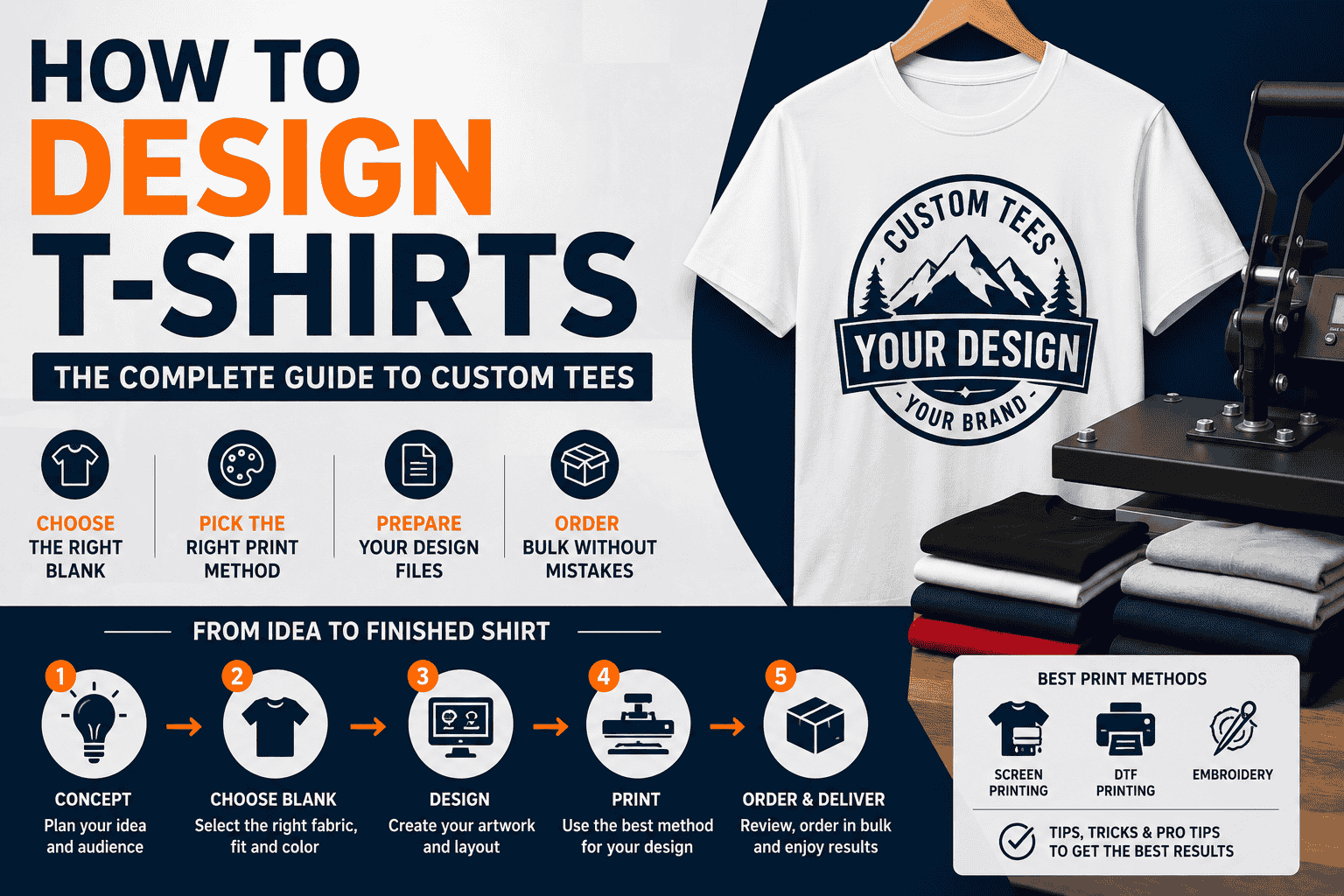
Designing a t-shirt looks simple until you actually try to do it. The idea is in your head, the brand is clear, the audience is obvious — and then the questions start. Which blank do I order? What file format does the printer need? Can I use that font commercially? Will this design survive 50 washes? Why did the colors come out wrong?
This guide answers all of it — from the design concept stage through blank selection, print method choice, file preparation, and ordering bulk without mistakes. Whether you're designing a team uniform, building a clothing brand, creating event merchandise, or setting up a decorated apparel program for a business, this is the guide that takes you from idea to finished shirt correctly the first time.
Who this guide is for: clothing brands, team managers, screen printers, promotional merchandise buyers, small business owners, event organizers, and anyone ordering more than 12 custom t-shirts who wants to do it right.
Step 1 — Define the Purpose Before You Design Anything
The most common t-shirt design mistake is designing the shirt before deciding what the shirt is for. Purpose determines everything: the blank, the print method, the color choices, the graphic style, and the budget. Before opening a design tool, answer these four questions:
-
Who is wearing this shirt? A school team's players have different needs than a brewery's retail customers. A corporate event's staff has different needs than a lifestyle brand's Instagram audience. The wearer determines the blank, the fit, and what the design needs to communicate.
-
Where will this shirt be worn? Athletic activity demands moisture-wicking performance fabric. A retail customer wants a soft, premium hand-feel. A work crew needs heavyweight durability. The environment determines the fabric construction before the design is started.
-
What does the shirt need to say? Team pride, brand identity, event memory, organizational message — the shirt's job shapes the graphic. A mascot and school colors serve a different communication goal than a minimalist brand wordmark on a lifestyle tee.
-
What is the budget per shirt? Budget determines blank tier and print method. A $5 per-shirt budget points toward a Gildan 5000 with one-color screen printing. A $25 per-shirt budget opens up Bella + Canvas 3001 with full-color DTF printing.
Step 2 — Choose the Right Blank T-Shirt
The blank is not a background for your design — it is half the product. A great design on the wrong blank produces a shirt people don't enjoy wearing, which defeats the purpose of the branded apparel in the first place. Here's how to choose the right blank for every program:
For Budget Events, Schools & High-Volume Programs
The Gildan 5000 Heavy Cotton T-Shirt is the most ordered wholesale t-shirt in the US market — 5.3oz 100% preshrunk cotton, S through 5XL, ~30 colors, starting under $2.50 per unit at volume. The slightly rough open-end cotton surface absorbs plastisol screen printing ink cleanly and consistently across thousands of prints per run. Pair with the Gildan 18500 Pullover Hoodie or Gildan 18000 Crewneck for a matching bundle program.
For Lifestyle Brands & Boutique Retail
The Bella + Canvas 3001 Unisex Jersey Tee is the retail-quality wholesale blank — 4.2oz Airlume combed and ring-spun cotton with 100+ colors, a modern slim fit, and the ultra-soft hand-feel that commands $25–$40 retail pricing. The 3001 is the standard blank for streetwear, lifestyle brands, and any program where customers are buying the shirt as much as the design. Pair with the Bella + Canvas 3719 Sponge Fleece Hoodie for a premium matching set.
For Vintage & Garment-Dyed Aesthetics
The Comfort Colors 1717 Heavyweight Ring-Spun Tee is the garment-dyed standard — 6.1oz ring-spun cotton dyed after construction for naturally muted, washed tones that no piece-dyed fabric replicates. Available in 65+ colorways. The right choice for brands targeting Southern lifestyle, outdoor heritage, craft brewery, and vintage streetwear audiences. Pair with the Comfort Colors 1567 Garment-Dyed Hoodie.
For Soft-Hand on a Budget
The Gildan 64000 Softstyle T-Shirt is the middle ground — 4.5oz ring-spun cotton that is noticeably softer than the Gildan 5000 at a significantly lower price than Bella + Canvas. The right choice for programs that need a softer tee without paying premium pricing. The Next Level Apparel 3600 is a close competitor at a similar price point.
For Athletic & Performance Programs
Moisture-wicking 100% polyester performance tees from Augusta Sportswear, Badger Sport, and C2 Sport are the standard for athletic teams, gym merchandise, and corporate wellness programs. The polyester construction manages sweat during activity but requires polyester-compatible decoration methods. Explore the full Performance T-Shirts catalog.
For Sustainable & Eco-Certified Programs
The Allmade AL2100 GOTS Organic Cotton Tee is the only wholesale blank allowing a documented, audited 'made with GOTS-certified organic cotton' claim. The tri-blend AL2004 carries Repreve and Carbonfree certifications for programs that need specific sustainability credentials.
For Made in USA Programs
The Volunteer Knitwear VL100 All-American Tee is manufactured entirely in the United States — domestically grown cotton, domestic mill, domestic cut and sew. The right blank for heritage brands, patriotic merchandise, trade union programs, and any program requiring an FTC-compliant Made in USA claim.
Quick Blank Selection Reference
|
Program Type |
Right Blank |
Why |
|
Events, schools, high-volume |
Gildan 5000 |
Under $2.50/unit, S–5XL, excellent print surface |
|
Lifestyle & boutique retail |
Bella+Canvas 3001 |
Airlume combed ring-spun, 100+ colors, retail-quality |
|
Vintage/garment-dyed aesthetic |
Comfort Colors 1717 |
Garment-dyed, 65+ washed colorways |
|
Soft-hand on a budget |
Gildan 64000 Softstyle |
Ring-spun softness at accessible pricing |
|
Athletic teams & gyms |
Augusta / Badger / C2 Sport |
Moisture-wicking polyester, team colors |
|
Eco-conscious brand |
Allmade AL2100 |
GOTS organic cotton certification |
|
Made in USA program |
Volunteer Knitwear VL100 |
FTC-compliant domestic supply chain |
|
Premium soft-hand alternative |
Next Level 3600 |
Combed ring-spun, between Gildan and Bella pricing |
The print method shapes the design — not the other way around. Designing a 12-color photographic image and then discovering you're screen printing it is the most expensive mistake in custom apparel. Choose your decoration method first.
Screen Printing — The High-Volume Standard
Screen printing uses a mesh screen and squeegee to push ink through a stencil onto the fabric — one screen per color. Screen printing is the right choice when you're printing a design with 1–6 solid colors across a large quantity (24+ shirts is the standard economic threshold). It produces the most durable, vibrant prints on cotton fabrics and is the standard for school athletic programs, event shirts, and most corporate promotional programs.
Screen printing design requirements: vector artwork (AI, EPS, or PDF format); solid color separations; no gradients or photographic images unless converted to halftone; minimum text size of 0.5 inches for legibility after printing. Our in-house screen printing team handles artwork preparation — but understanding these requirements prevents design surprises.
Explore our screen printing services for pricing, turnaround, and technical specifications.
DTF Printing — The Full-Color Standard
DTF (direct-to-film) printing transfers a full-color design from a printed film onto the fabric using heat and pressure — there are no per-color charges, no screens, and no minimum quantity requirements. DTF is the right choice when your design has multiple colors, gradients, photographic elements, or fine detail that screen printing can't reproduce accurately.
DTF works on cotton, polyester, blends, and virtually every fabric type — making it versatile across blanks. The printed design sits slightly on top of the fabric surface rather than penetrating into fibers (like screen printing does), producing excellent color accuracy but a slightly different texture on the print area.
Explore our DTF printing services for the full DTF catalog and turnaround times.
Embroidery — The Premium Decoration Standard
Embroidery stitches the design directly into the fabric using thread — producing a raised, textured decoration with a premium appearance that communicates quality beyond any printed method. Embroidery is the standard for corporate uniform programs, polo shirts, hoodies, bags, and hats where a stitched logo reads as professional investment rather than promotional merchandise.
Embroidery design requirements: simplified artwork (not photographic); maximum stitch count typically 10,000–15,000 for standard left-chest logo placement; no fine gradients (thread colors are solid); vector artwork preferred for digitizing. Our in-house embroidery team handles digitizing from your logo file.
Explore our embroidery services for polo shirts, hoodies, hats, and bags.
Which Method for Which Design — Quick Guide
|
Design Type |
Screen Printing |
DTF Printing |
Embroidery |
|
Simple 1–3 color logo |
Best — lowest cost at volume |
Works, no volume needed |
Works on polos/hats |
|
4–6 color graphic |
Good — multicolor screens |
Works well |
Not ideal for complex color |
|
Full-color photo or gradient |
Not ideal |
Best method |
Not possible |
|
Fine text or small detail |
Good if text is 0.5"+ |
Best for fine detail |
Limit fine detail |
|
Logo on polo shirt or hat |
Not standard |
Works |
Best — standard for corporate |
|
High volume 100+ units |
Best — cost drops significantly |
Works, no volume discount |
Works |
|
Low volume under 24 units |
Expensive per unit |
Best — no minimum |
Works from 12 pieces |
Step 4 — Design Your T-Shirt Graphic
Now the design itself. The most effective t-shirt designs follow a few principles that hold across every style, category, and audience.
Principle 1: Simplify
The five-second test is the standard: show your design to someone for five seconds and ask them to describe it. If they can't capture the essential message in those five seconds, the design is too complex. The best-selling t-shirt designs in history — across band tees, sportswear, and lifestyle brands — are almost universally simple: a single bold graphic, a wordmark, or a short phrase. Complexity reduces impact.
Principle 2: Design for the Blank
Different blanks have different printable areas and silhouettes that the design must account for. The standard front chest print area is approximately 12" × 14" on an adult medium. A full-back print runs approximately 11" × 14". Sleeve prints are typically 3"–4" wide. For specific placement dimensions, contact our team or see the technical specifications on each Wholesale t-shirt .
Principle 3: Contrast
The design must be legible against the shirt color. A light gray design on a white shirt disappears at five feet. A dark navy design on a black shirt disappears completely. Design with enough contrast between the graphic and the blank color to be readable across a room. For dark-on-dark programs, consider a single high-contrast accent color (white, gold, red) to create the separation the design needs.
Principle 4: Typography
If your design includes text, use a maximum of two typefaces. More than two fonts almost always creates visual chaos. Choose typefaces that are: (1) legible at the intended print size — avoid thin, condensed, or decorative fonts below 24pt equivalent; (2) appropriate for the audience — sans-serif feels modern and clean, serif feels traditional and established, script feels personal; (3) licensed for commercial use — many free fonts are not licensed for use on products you sell. When in doubt, purchase a commercial license.
Principle 5: Use the Right Color Count for Your Method
If you are screen printing, each color in your design is a separate screen — and each screen adds cost. A 1-color design is the most affordable and often the most striking. A 3-color design covers most team and brand logo programs. A 6-color design handles most complex graphics. More than 6 colors in screen printing typically makes DTF a more cost-effective choice.
Design Software Recommendations
-
Adobe Illustrator — the industry standard for t-shirt graphic design; vector-based, precise color control, exports to AI/EPS/PDF formats that printers require; the right tool if you design regularly
-
Adobe Photoshop — the industry standard for raster/photographic designs; required for halftone separations in screen printing; right for photo-based or texture-heavy designs
-
Canva (Pro) — accessible for non-designers; exports PNG at high resolution; works for DTF programs but cannot produce true vector files for screen printing
-
Inkscape — free, open-source vector design; exports SVG and can export to formats printers accept; the right tool for budget-conscious designers who need vector output
Step 5 — Prepare Your Design File Correctly
The most common cause of production delays, reprints, and color problems is incorrect file preparation. Here's what every printer needs from your design file:
File Format Requirements
-
Screen printing: vector artwork preferred — AI (Adobe Illustrator), EPS, or PDF with fonts outlined and artwork in separated colors. Raster files (JPEG, PNG) accepted at 300 DPI minimum at print size.
-
DTF printing: high-resolution PNG with transparent background at 300 DPI minimum at the intended print size. JPEG is acceptable for photographic designs. Color mode: RGB (DTF printers work in RGB).
-
Embroidery digitizing: vector files (AI, EPS, PDF) preferred for digitizing. High-resolution PNG also works. The embroidery team converts your artwork to a stitch file (DST, PES, or similar) — you don't need to provide the stitch file.
Resolution — The Most Common File Problem
A design file that looks fine on a computer screen at 72 DPI will print blurry at 72 DPI — because screens display at 72–96 DPI while printers require 300 DPI minimum. To calculate whether your file is high enough resolution: multiply the intended print size (in inches) by 300. A 12-inch wide print requires a file at least 3,600 pixels wide (12 × 300 = 3,600). A file smaller than this will print soft or pixelated.
The fix: always design in vector (AI or EPS) for graphics and text — vector files are resolution-independent and print crisply at any size. Only use raster (Photoshop/PNG) when the design is specifically photographic.
Color Mode — RGB vs CMYK vs PMS
Computer screens display color in RGB (Red, Green, Blue). Printers apply ink in CMYK (Cyan, Magenta, Yellow, Black). PMS (Pantone Matching System) is the universal standard for exact color matching across printers and production runs. For the most accurate color results in screen printing, specify your colors as PMS codes — the printer mixes inks to exact PMS specifications regardless of how the colors display on your monitor. For DTF printing, RGB color mode produces the most accurate results since DTF printers work in RGB color space.
Text — Convert to Outlines
When you send a design file with live text (editable text), the printer's computer must have the same fonts installed to display them correctly. If the font is missing, text will substitute to a default font and ruin the design. The solution: before sending your file, select all text and convert it to outlines or curves (in Adobe Illustrator: Type → Create Outlines). This converts text to vector shapes that display correctly on any computer regardless of fonts installed.
Step 6 — Choose Your Placement
Where the design sits on the shirt affects how it reads, who it appeals to, and what it communicates. Standard placements:
|
Placement |
Location |
Size Range |
Best For |
|
Left Chest |
Upper left, ~4" from center |
3"–4" wide |
Corporate logos, small brand marks, team crests |
|
Center Chest |
Upper center, collarbone level |
8"–12" wide |
Team programs, event shirts, statement graphics |
|
Full Front |
Center, larger scale |
10"–14" wide |
Lifestyle brands, large graphic programs |
|
Full Back |
Center back |
11"–14" wide |
Team rosters, large event graphics, lifestyle back prints |
|
Sleeve |
Left or right upper sleeve |
3"–4" wide |
Secondary logo, year designation, event name |
|
Pocket Area |
Left chest pocket position |
3"–4" wide |
Heritage/workwear programs, vintage aesthetic |
|
All-Over Print |
Entire shirt surface |
Full garment |
Sublimation programs on polyester; lifestyle brands |
Step 7 — Order Your Custom T-Shirts
You have the design, the file is prepared correctly, and the blank is chosen. Here's how to place a bulk order without the most common mistakes:
Size Distribution for Team & Event Orders
The most common ordering mistake for team and event programs is guessing size distribution instead of collecting it. For team programs: collect actual size requests from every participant — do not estimate. For event programs where you cannot collect individual sizes in advance, a standard adult distribution for most programs is: S (10%), M (25%), L (30%), XL (25%), 2XL (10%). Order 10% extra in your most common size for last-minute additions.
Color Accuracy — Request a Pre-Production Sample
For orders over 100 units or for programs where exact color matching is critical (matching a school color, a brand color, or a two-tone program where garment colors must coordinate), request a pre-production print sample before the full run. A sample print on the actual garment in the actual ink color costs less than reprinting 100 shirts because the blue came out too purple.
Proof Approval — Read It Carefully
Before production begins, you will receive a digital proof showing your design placement, size, and colors on a mockup of the garment. Read the proof carefully: confirm the design is in the correct placement, confirm the size is correct relative to the garment, confirm there are no spelling errors, and confirm the colors match your expectations. Once you approve the proof, production begins — changes after proof approval typically require a new setup fee.
Minimum Orders & Pricing
Custom decorated t-shirts via screen printing, DTF printing, or embroidery are available from 12 pieces with no setup fee at Simplstc Apparel. Blank t-shirts have no minimum order. Volume discounts apply automatically at every quantity tier — the larger the order, the lower the per-unit cost on both blanks and decoration.
Step 8 — Designing T-Shirts for Specific Programs (The Part Most Guides Skip)
Generic t-shirt design advice applies to everyone — which means it's optimized for no one. Here's how to design specifically for the most common program types.
School Athletic Teams
School team t-shirts have a specific design mandate: the school name and team/sport must be immediately readable at a distance. Use bold, high-contrast typography as the primary design element. Team colors are non-negotiable. Avoid complex graphics that compete with the text. Order on Gildan 5000 for budget programs or Augusta Sportswear performance tees for active athletic use. See the full Cotton T-Shirts and Performance T-Shirts catalogs.
Gym & Fitness Studio Merch
Gym merchandise must look as good on social media as it does in the gym. The design should be wearable in public contexts beyond the gym — members won't wear it consistently if it reads as pure gym branding. Consider a secondary logo placement (left chest) for gym programs where the brand is recognizable but not dominant. Blanks: Bella + Canvas 3001 for lifestyle retail gym programs; Next Level Apparel as a value alternative. Pair with matching tank tops and hoodies for a complete gym merchandise collection.
Corporate Event & Promotional T-Shirts
Corporate event t-shirts are worn once at the event and then used as casual wear — design for the second occasion, not the first. A shirt that looks good on a Tuesday grocery run extends the brand impression beyond the event day. Use a moderate-size design (not full-front) with the company logo and event year. Consider the Gildan 64000 Softstyle for corporate programs where the shirt needs to feel premium without breaking the promotional budget.
Streetwear & Clothing Brand Drops
Streetwear brand t-shirt design follows different rules — graphic scale, cultural references, and perceived authenticity matter more than readability at distance. Oversized designs, distressed effects, vintage typography, and garment-dyed blanks are the standard toolkit. The Comfort Colors 1717 is the blank that builds streetwear credibility before a single graphic is applied. DTF printing is the preferred method for complex streetwear graphics — no color limits, no setup screens.
Nonprofit, Church & Community Organization Programs
Community program t-shirts need broad appeal across age groups and body types — avoid designs that skew too young, too edgy, or too niche. The design should create a sense of belonging without alienating any member of the community. Order with inclusive sizing (S through 4XL) from Gildan 5000 or Port & Company for the most accessible pricing. Consider a simple, bold design with the organization name and year.
Restaurant, Bar & Hospitality Merchandise
Hospitality merchandise competes against a thousand other branded items in the customer's memory. The shirt needs to remind the customer of the experience they had — a feeling, not just a logo. Pair the logo with an element that evokes the brand's personality: a craft brewery's vintage-style hop illustration, a restaurant's signature dish as a graphic element, a bar's local landmark. The Comfort Colors 1717 garment-dyed tee is the default blank for food and beverage merchandise — the vintage wash aesthetic aligns with craft and independent hospitality brand positioning.
What Makes a T-Shirt Design Actually Get Worn vs Donated
The real measure of a t-shirt design's success isn't how it looks in a mockup — it's whether recipients wear it regularly or donate it within a year. Here's what separates wearable designs from closet fillers:
-
The design works in multiple contexts. A shirt that only works at the event it was made for gets worn once. A design that works at the grocery store, at the gym, and around friends gets worn dozens of times — and generates brand impressions with dozens of different people.
-
The blank is comfortable enough to choose over plain shirts. Customers and recipients have a drawer full of t-shirts. They reach for the ones they find most comfortable. If the blank is stiff, itchy, or ill-fitting, the design doesn't matter — the shirt stays in the drawer. The blank choice determines daily wearability.
-
The colors hold through washing. A design that fades, cracks, or peels after five washes damages the brand it was meant to promote. Water-based inks on ring-spun cotton hold longer than plastisol on low-quality fabric. Quality blanks with quality decoration outlast cheap alternatives.
-
The fit is right for the audience. Gildan 5000's relaxed boxy fit is right for one audience; Bella + Canvas 3001's slim modern fit is right for another. Ordering the wrong fit causes recipients to skip the shirt regardless of how good the design is.
-
The design is timeless enough not to expire. Event-specific designs (a date, a specific reference) make the shirt feel outdated quickly. Brand and team designs without expiring references stay relevant indefinitely.
FAQs
What file format should I send for t-shirt printing?
For screen printing: vector files — AI (Adobe Illustrator), EPS, or outlined PDF. For DTF printing: high-resolution PNG with transparent background at 300 DPI minimum at print size. For embroidery: vector files preferred (AI, EPS) but high-resolution PNG works for digitizing. Always convert text to outlines before sending.
What is the minimum DPI for t-shirt design files?
300 DPI at the intended print size is the minimum for raster files. A 12-inch wide print requires a file at least 3,600 pixels wide. Smaller files print blurry. Vector files (AI, EPS) are resolution-independent and print crisply at any size — use vector whenever possible.
What is the best blank t-shirt for screen printing?
The Gildan 5000 Heavy Cotton T-Shirt is the most popular screen printing substrate at volume — the 5.3oz open-end cotton absorbs plastisol ink evenly and consistently. For premium programs using water-based inks, the Bella + Canvas 3001 combed ring-spun cotton produces the most vibrant soft-hand results. See our full screen printing services guide.
What is the difference between screen printing and DTF printing?
Screen printing uses physical screens and squeegees to apply ink one color at a time — most cost-effective for large quantities and simple color designs. DTF printing transfers a full-color printed film onto the fabric — most versatile for complex multi-color designs, gradients, photographic images, and low quantities. See our DTF printing services for full details.
How do I design a t-shirt if I'm not a graphic designer?
Options: (1) Canva or Adobe Express for simple text-and-logo designs — both have free tiers and export usable PNG files for DTF printing programs. (2) Hire a freelance designer on Fiverr or Upwork — provide the design brief, colors, and intended use; specify that you need print-ready vector files. (3) Contact our decoration team — for embroidery programs, we can work with basic logo files and handle the digitizing process.
What size should a t-shirt design be?
Standard sizing: left chest logo 3"–4" wide; center chest design 8"–12" wide; full front graphic 10"–14" wide; full back graphic 11"–14" wide. Always confirm maximum print area with your decorator before finalizing design size — print area dimensions vary slightly by garment size and printer.
How many colors can I use in a t-shirt design?
For screen printing: 1–6 colors is standard; each additional color adds a screen setup cost. More than 6 colors typically makes DTF more cost-effective. For DTF printing: unlimited colors — full-color photographic designs with gradients print for the same cost as a simple one-color design.
Where can I order custom t-shirts wholesale?
Simplstc Apparel offers custom decorated t-shirts via screen printing, DTF printing, and embroidery from 12 pieces with no setup fee. Blank t-shirts available with no minimum. Free shipping on all orders over $149.99. Call +1 773-245-6241 for a quote.

Need Help?
Get in touch with our experts.